Rth: Parallel R through Thrust
Professor Norm Matloff
Dept. of Computer Science
University of California at Davis
Davis, CA 95616
matloff@cs.ucdavis.edu
Authors:
Norm Matloff, UC Davis
Drew Schmidt, University of
Tennessee
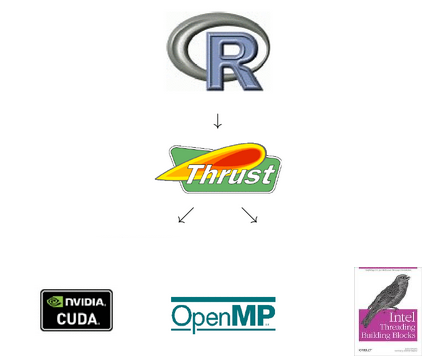
Thrust is a powerful tool for parallel programming. Rth consists of R library functions that enable one to achieve parallelism through Thrust, without needing to know Thrust or C++.
Here are few details:
But those who do know C++/Thrust can easily develop their own apps using the Rth approach.
Thrust operations are high-level, such as sorting, selecting, searching and prefix scan. From these basic building blocks, a myriad of parallel applications can be coded.
For example, consider Rth's rthorder(), which (in one of its options) serves as a parallel version of R's rank(). It first calls Thrust's sort_by_key() function, and then uses Thrust's scatter() function to permute the results in a way that produces the proper ranks.
One aspect of this to consider is that in the GPU case Thrust will choose the grid configuration parameters for you, with hopefully pretty good values.
I (Norm) began the Rth project in 2012, presenting a talk on it at useR! 2012. I was delighted when Drew, who is now of pbdR fame, offered to join the project.
However, I then postponed further work on the project until I reached the Rth chapter my book, Parallel Programming for Data Science (whose draft of the first half you can download here ). We resumed work on Rth in May 2014.
See below for a list of currently available functions Rth. More are coming. User-written Rth apps would be most welcome!
Any system with the gcc compiler should work, though testing has been only on Linux and Macs so far. To obtain gcc for Windows, install Rtools, as well as TBB. If you have a GPU, you'll need nvcc.
TBB is sometimes considerably faster than OpenMP. If you wish to use TBB as the backend will need to install TBB separately; see below.
$ R CMD INSTALL -l ~/R Rth-master
$ export LD_LIBRARY_PATH=/usr/local/lib/tbb
$ R CMD INSTALL -l ~/R Rth-master --configure-args="--with-backend=TBB \
   --with-tbb-incdir=/usr/local/include \
   --with-tbb-libdir=/usr/local/lib"
On a Mac, the library path is set slightly differently:
$ export DYLD_LIBRARY_PATH=/usr/local/lib/tbb
At present, the above automatically sets up for the OpenMP and TBB backends only, with the GPU case still under construction. For now, compile by hand, using the instructions below.
Many R routines in the Rth package allow the user to set the number of threads uses on multicore backends. Some points should be mentioned regarding this.
First, for TBB, the designers of that library do not recommend manually setting the number of threads. In any case, the user can only control the maximum number of threads, not the actual number.
Other than asking one of the R routines in Rth to set this number, one can do it via the environment variable TBB_NUM_THREADS, as with the OpenMP case below.
In the OpenMP case, you can set the number of threads in an environment variable in your shell, e.g.
export OMP_NUM_THREADS=4
Or, set it in a file .Renviron in your home or current directory, e.g. with a line
OMP_NUM_THREADS=2
Note that somehow this variable seems to be set when R first starts up. Thus for instance using R's own environment-setting function, Sys.setenv(), seems NOT to work in this case.
If you get the message function 'dataptr' not provided by package 'Rcpp' you may have forgotten to run
> library(Rcpp)
This is done automatically by the full Rth package, but if you compiled a routine yourself, this is essential. You also may have an out-of-date version of Rcpp.
With large objects you may encounter "Error: long vectors not supported yet." This appears to be related to the fact that R is currently in transition to fully implementing long vectors (and a possible issue with Rcpp).
> library(Rth)
Loading required package: Rcpp
> x <- runif(25)
> x
 [1] 0.90189818 0.68357514 0.93200351 0.41806736 0.40033254 0.09879424
 [7] 0.70001364 0.01025429 0.30682519 0.74398691 0.04592790 0.57226260
[13] 0.66428642 0.14953737 0.30014257 0.92142903 0.99587218 0.16254603
[19] 0.36737230 0.46898850 0.76138804 0.67405064 0.15926002 0.19043531
[25] 0.81125042
> rthsort(x)
 [1] 0.01025429 0.04592790 0.09879424 0.14953737 0.15926002 0.16254603
 [7] 0.19043531 0.30014257 0.30682519 0.36737230 0.40033254 0.41806736
[13] 0.46898850 0.57226260 0.66428642 0.67405064 0.68357514 0.70001364
[19] 0.74398691 0.76138804 0.81125042 0.90189818 0.92142903 0.93200351
[25] 0.99587218
We are slowly adding to the package. Requests are welcome. Contributions even more welcome!
Current routines:
The current package does not automatically build for the GPU case. For the latter, use the instructions below. For completeness, instructions for hand compilation for the OpenMP case are included as well.
Normally, C/C++ code to be linked to R is built by running R CMD SHLIB. This can still be done with Rth, but with some adjustments, described here.
Below are the steps, say for rthsort.cpp. You will need to adjust some file paths for your setting. The examples are for Linux, but Windows should be similar as long as you have gcc.
One needs to inform Thrust which backend we want, and one must tell gcc to include OpenMP. This can be done by setting flags before running R CMD SHLIB:
   export CPLUS_INCLUDE_PATH=/home/matloff/R/Rcpp/include
   export PKG_CPPFLAGS="-I/home/matloff/Thrust -fopenmp \
     -DTHRUST_DEVICE_SYSTEM=THRUST_DEVICE_SYSTEM_OMP -g"
   export PKG_LIBS="-lgomp"
   R CMD SHLIB rthsort.cpp
In this case, there was a subdirectory thrust within /home/matloff/Thrust, with the .h header files in that subdirectory. Also, the Rcpp package was in /home/matloff/R/Rcpp Adjust for your Thrust and R package locations.
This produces rthsort.so, ready to use from R.
Same as for OpenMP above, with modifications as seen earlier in the TBB build:
   export CPLUS_INCLUDE_PATH=/home/matloff/R/Rcpp/include
   export PKG_CPPFLAGS="-I/home/matloff/Thrust -I/home/matloff/MyInclude/ \
      -DTHRUST_DEVICE_SYSTEM=THRUST_DEVICE_SYSTEM_TBB -g"
   export PKG_LIBS="-L/home/matloff/MyLib/tbb -ltbb"
   R CMD SHLIB rthsortW.cpp
In the first stage, one runs a straight nvcc compile (since I've used .cpp suffixes throughout, you need to tell nvcc these are really CUDA files, via -x cu):
   export CPLUS_INCLUDE_PATH=/home/matloff/R/Rcpp/include
   nvcc -x cu -c rthsort.cpp -Xcompiler "-fpic" -I/usr/include/R
This produces rthsort.o, which you input to R CMD SHLIB. For that purpose, you must first indicate where the CUDA files are:
   export PKG_LIBS="-L/usr/local/cuda/lib64 -lcudart"
   R CMD SHLIB rthsort.o -o rthsort.so
Again, this produces rthsort.so.
Continuing the rthsort example, say for the GPU case:
Before starting R:
$ export LD_LIBRARY_PATH=/usr/local/cuda/lib64
From within R:
library(Rcpp)
dyn.load("rthsort.so")
x <- runif(1000)
.Call("rthsort_double",x)
You can use the routines in the Rth package directly, without writing your own code. But if you have experience writing in C++, or at least C, you are encouraged to write your own Rth routines, and the code here has been written to serve as examples which will facilitate that.
At first, don't get distracted by all the "housekeeping" code. Most of this is just constructors to set up needed vectors.
For instance, here is code from the Kendall's Tau routine:
thrust::counting_iteratorseqa(0); thrust::counting_iterator seqb = seqa + n - 1; floublevec dx(x,x+n); floublevec dy(y,y+n); intvec tmp(n-1); thrust::transform(seqa,seqb,tmp.begin(),calcgti(dx,dy,n));
The first five lines set up vectors. The sixth line is the one that does the actual computation. You do have to learn how to set up the vectors, but this is easy.
The one C++/Thrust construct new to many programmers will be functors, which are simply callable versions of C structs. Reading an example or two will be enough for you to write your own functors.
See my open source book on parallel programming for details on writing Thrust code. The Thrust chapter can be read without referring to any other material in the book. Also, see the examples developed by the Thrust team.
Older GPUs can handle only single-precision numbers, and even the newer ones may have speed issues with double-precision. R, on the other hand, does not accommodate single-precision code well. Accordingly, the code uses typedef to choose double or float, based on whether the GPU compiler flag is set.
You can of course view Thrust as a black box. But if you wish to learn its innards, I recommend writing little test programs, compiling them for a multicore backend, and then stepping through the code with a debugging tool. One advantage of Thrust's consisting only of "include" files is that the debugger will automatically show source lines.
The standard compiler on Macs is clang, which does not support OpenMP. Though you could also install gcc, your easiest route is to use TBB; see below.
The code here represents a first cut at efficient code, and improvements will be made over time. Suggestions welcome!
Currently the best speedups come from rthdist(), rthhist(), rthorder(), rthpdist(), rthrank(), rthsort() and rthtable().
For many of the problems here, parallel operations will be beneficial only for very large cases, as the overhead of copying from Thrust host to Thrust device is substantial in smaller problems. In multicore (OpenMP/TBB) settings this copying is unnecssary; a suggestion for how to avoid it is here, and the Rth routines could be tweaked accordingly.
Some of the Rcpp code might be inefficient. Also, Rcpp11 may bring an improvement.
It is often the case that TBB code runs faster than OpenMP. You may wish to give both a try for any particular app.
Memory size in GPUs tends to be limited. If you have a problem that is too large for GPUs, you may wish to modify the Rth algorithm by breaking the data into chunks.
In some cases, the Rth routines yield a superlinear speedup over their R counterparts. This would seem to be an algorithm issue, rather than a computational one per se.
You need not know the following in order to use Rth, but it is useful background information.
OpenMP is a very widely used open source framework for programming on multicore systems. It consists of pragmas that a C/C++/Fortran programmer can insert into code in those languages, basically instructions along the lines of "do the following section in parallel."
Threading Building Blocks (TBB), is another system for parallel programming, developed by Intel. It can often produce faster code than OpenMP. However, TBB is considerably more difficult to prograam in, though in the Thrust context the programmer does not get directly involved in TBB, which just serves as a possible backend.
Like R itself, Rth comes with no warranty of any kind. The package has been tested and worked well in those tests. If you find issues upon further testing, please send a bug repor to one of the authors.
Apparently due to a complex problem in the interaction of two or more of R, Rcpp, TBB and Thrust, rthtable() and rthpdist() currently do not work under TBB. There seem to be similar problems in CUDA, for rthcolsums(), rthkendall(), rthrnorm() and rthrunif().
The random number generators rthrnorm() and rthrunif() use the underlying Thrust RNG system, on which we have not done thorough testing.